Posts

Docker

Image
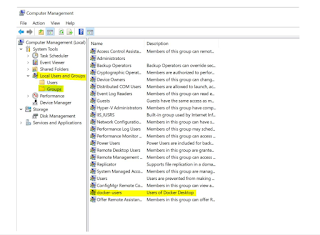
 https://docs.docker.com/get-started/overview/#the-docker-platform create sample app node js with docker https://nodejs.org/en/docs/guides/nodejs-docker-webapp/ add user in docker group https://avidosguy.wordpress.com/2019/10/10/solved-you-are-not-allowed-to-use-docker-you-must-be-in-the-docker-users-group/ Step 1. Install docker https://docs.docker.com/engine/install/ step 2. add user in Docker Group Step 3. ( Windows Subsystem for Linux ) wsl_update_x64.msi  run and install . Step 4 . Open Docker Desktop and strat

Interview Question Node /React

  1. Local storage vs Session storage vs cookie 2.  spread  operator- three dots (…) 3. Rest Parameter/Operator 4. object.create vs object.assign 5. react life cycle 6. hook vs class componenet 7. var vs let vs const 8. esca6 9. arrow function vs normal function 10. 

ReactJS Html To pdf & HTML table to pdf

 https://github.com/MrRio/jsPDF/issues/762  //-------- import   html2canvas   from   'html2canvas' ; import   jsPDF   from   "jspdf" ; downloadFile() { let pdfName = "licencia"; var doc = new jsPDF({ format: "a4" }); html2canvas(document.getElementById("pdf-doc"), { scale: "5" }).then(canvas => { console.log("Capturando"); this.imgFile = canvas; doc.addImage(this.imgFile, "JPEG", 5, 5, 200, 285); doc.save(pdfName + ".pdf"); }); } =============================================== //add footer      addFooters  =  doc   =>  {          const   pageCount  =  doc . internal . getNumberOfPages ();          doc . setTextColor ( "black" );          doc . setFont ( 'helvetica' ,  'italic' )          doc . s...

Ubantu Linux command

New Ubantu system setup 1. Install NPM in Ubuntu 20.04 LTS through repository Since the package is already available in standard Ubuntu repository. Therefore, first we need to update the repository to make the latest version of the package available. Hence, open a terminal and issue the following – sudo apt update Next, to install NPM – sudo apt install npm To verify the version of NPM we have installed – npm -v It would return – 6.14.4   Reference : https://techpiezo.com/nodejs/install-npm-in-ubuntu-20-04-lts/ 2. Install  Node Js sudo apt install nodejs 3. Install  Visual Studio code https://code.visualstudio.com/Download .deb 64 bit download and install   Access Ubuntu server using Putty: sudo su   ->enter vim filenamd.extension :w -save :qa exit i for insert mv old file  new file rm -remove file rmdir -remove directory rm -r mydir -non empty directory cp -r source /destination path assign permission chown -R www-data folder Data...

ANTD design

 Antd deign- Date initialization issue as the time of edit mode. we have set  obj . date1 = moment ( obj . Date1 ,  'YYYY-MM-DD' ); 

Post Gre SQL dataabase

  # Setup the repository # /* # Install the public key for the repository (if not done previously): sudo curl https://www.pgadmin.org/static/packages_pgadmin_org.pub | sudo apt-key add # Create the repository configuration file: sudo sh -c 'echo "deb https://ftp.postgresql.org/pub/pgadmin/pgadmin4/apt/$(lsb_release -cs) pgadmin4 main" > /etc/apt/sources.list.d/pgadmin4.list && apt update' # # Install pgAdmin # # Install for both desktop and web modes: sudo apt install pgadmin4 # Install for desktop mode only: sudo apt install pgadmin4-desktop # Install for web mode only:  sudo apt install pgadmin4-web  # Configure the webserver, if you installed pgadmin4-web: sudo /usr/pgadmin4/bin/setup-web.sh */ Hierarchy tree - get all child of same table using parentid WITH RECURSIVE parent("childId","childCode","childParentId" ) AS (    Select "childId","childCode","childParentId"  FROM table Where "child...

Calculate web application space requirement

 https://wiki.processmaker.com/3.2/ProcessMaker_Server_Sizing https://docs.adobe.com/content/help/en/experience-manager-64/managing/managing-further-reference/hardware-sizing-guidelines.html https://hostadvice.com/how-to/how-to-determine-the-correct-size-and-type-of-a-web-server/